OpenID Connect allows your workflows to exchange short-lived tokens directly from your cloud provider.
GitHub Actions workflows are often designed to access a cloud provider (such as AWS, Azure, GCP, HashiCorp Vault, and others) in order to deploy software or use the cloud's services. Before the workflow can access these resources, it will supply credentials, such as a password or token, to the cloud provider. These credentials are usually stored as a secret in GitHub, and the workflow presents this secret to the cloud provider every time it runs.
However, using hardcoded secrets requires you to create credentials in the cloud provider and then duplicate them in GitHub as a secret.
After you have established a trust connection with a cloud provider that supports OIDC, you can configure your workflow to request a short-lived access token directly from the cloud provider.
By updating your workflows to use OIDC tokens, you can adopt the following good security practices:
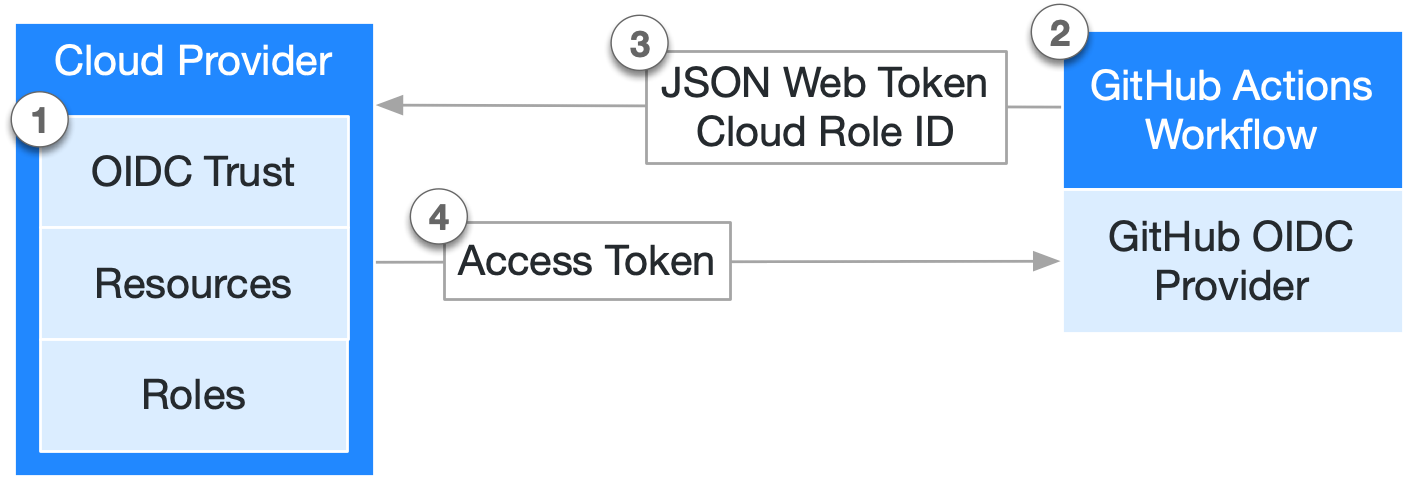
The following diagram gives an overview of how GitHub's OIDC provider integrates with your workflows and cloud provider:
Each job requests an OIDC token from GitHub's OIDC provider, which responds with an automatically generated JSON web token (JWT) that is unique for each workflow job where it is generated. When the job runs, the OIDC token is presented to the cloud provider. To validate the token, the cloud provider checks if the OIDC token's subject and other claims are a match for the conditions that were preconfigured on the cloud role's OIDC trust definition.
The following example OIDC token uses a subject (sub) that references a job environment named prod in the octo-org/octo-repo repository.
{
  "typ": "JWT",
  "alg": "RS256",
  "x5t": "example-thumbprint",
  "kid": "example-key-id"
}
{
  "jti": "example-id",
  "sub": "repo:octo-org/octo-repo:environment:prod",
  "environment": "prod",
  "aud": "https://github.com/octo-org",
  "ref": "refs/heads/main",
  "sha": "example-sha",
  "repository": "octo-org/octo-repo",
  "repository_owner": "octo-org",
  "actor_id": "12",
  "repository_visibility": "private",
  "repository_id": "74",
  "repository_owner_id": "65",
  "run_id": "example-run-id",
  "run_number": "10",
  "run_attempt": "2",
  "runner_environment": "github-hosted",
  "actor": "octocat",
  "workflow": "example-workflow",
  "head_ref": "",
  "base_ref": "",
  "event_name": "workflow_dispatch",
  "repo_property_workspace_id": "ws-abc123",
  "ref_type": "branch",
  "job_workflow_ref": "octo-org/octo-automation/.github/workflows/oidc.yml@refs/heads/main",
  "iss": "https://token.actions.githubusercontent.com",
  "nbf": 1632492967,
  "exp": 1632493867,
  "iat": 1632493567
}
Custom actions use the getIDToken() method from the Actions toolkit or a curl command to authenticate using OIDC.
For more information, see OpenID Connect reference.
GitHub Actions workflows can use OIDC tokens instead of secrets to authenticate with cloud providers. Many popular cloud providers offer official login actions that simplify the process of using OIDC in your workflows. For more information about updating your workflows with specific cloud providers, see Security hardening your deployments.
Organization and enterprise admins can include repository custom properties as claims in OIDC tokens. This enables attribute-based access control (ABAC) policies in your cloud provider, artifact registry, or secrets manager that are driven by repository metadata rather than hard-coded allow lists.
The end-to-end flow for using custom properties as OIDC claims is as follows:
business_unit, data_classification, or environment_tier) and assigns values to repositories. For more information, see Managing custom properties for repositories in your organization and OpenID Connect reference.repo_property_. No workflow-level configuration changes are required.repo_property_* claims, enabling fine-grained, attribute-based access decisions.Because this builds on GitHub's existing OIDC short-lived credential model, no long-lived secrets are required, and every token is scoped, auditable, and automatically rotated per workflow run.
To include a custom property in OIDC tokens, use the REST API or the settings UI for your organization or enterprise.
Using the settings UI: Navigate to your organization or enterprise's Actions OIDC settings page to view and manage which custom properties are included in OIDC tokens.
Using the REST API: Send a POST request to the /orgs/{org}/actions/oidc/customization/properties/repo endpoint to add a custom property to the OIDC token claims for your organization. For request parameters and full details, see the REST API documentation for managing OIDC custom properties: REST API endpoints for GitHub Actions OIDC.
The following example shows an OIDC token that includes two custom properties: a single-select property business_unit and a string property workspace_id. Each custom property appears in the token with the repo_property_ prefix.
{
  "sub": "repo:my-org/my-repo:ref:refs/heads/main",
  "aud": "https://github.com/my-org",
  "repository": "my-org/my-repo",
  "repository_owner": "my-org",
  "ref": "refs/heads/main",
  "repo_property_business_unit": "payments",
  "repo_property_workspace_id": "ws-abc123"
}
You can use the repo_property_* claims in your cloud provider's trust conditions to create flexible, attribute-based access control policies. For more information about the claim format, supported property types, and limits, see OpenID Connect reference.
Dependabot can use OIDC to authenticate with private registries, eliminating the need to store long-lived credentials as repository secrets. With OIDC-based authentication, Dependabot update jobs can dynamically obtain short-lived credentials from your cloud identity provider.
Dependabot supports OIDC authentication for any registry type that uses username and password authentication, when the registry is hosted on AWS CodeArtifact, Azure DevOps Artifacts, or JFrog Artifactory.
The benefits of OIDC authentication for Dependabot are:
For more information, see Configuring access to private registries for Dependabot.
For more information about configuring OIDC, see Security hardening your deployments.
For reference information about OIDC, see OpenID Connect reference.