Move through Code Quality findings on your pull request, including understanding severity labels, when each finding is best fixed, delegated, or dismissed, and how those choices shape your repository's code health.
In this tutorial, you'll follow a single pull request through Code Quality's analysis, from first comment to merge. You'll learn:
By the end, you'll have resolved every blocking finding on the example pull request and merged it with a clean Code Quality check, and you'll understand why you made each choice.
This is a guided walkthrough, so it favors understanding over speed. For basic steps on how to commit an autofix or dismiss a finding, see the companion how-to: Fixing code quality findings on a pull request.
Throughout this tutorial, we'll use a running example: a pull request that refactors some code will introduce several code quality issues into the default branch if it's merged as it is. A Code Quality scan has automatically run on the pull request and has reported several findings as comments.
Every finding you don't resolve at the pull request stage becomes an action item in your repository's backlog, and technical debt is often more expensive to pay down later than to address now. Right now, while the pull request is open, the code's context and intent are still fresh in your mind, which makes each finding, and its autofix, faster to assess, apply, or confidently dismiss.
Resolving findings at the pull request stage means your team spends less time triaging remediation work against feature work, and avoids the overhead of extra pull requests just to burn down a backlog.
When you open a pull request, Code Quality uses CodeQL to scan your changes against a set of rules and posts findings as comments by github-code-quality[bot]. Each comment includes a suggested autofix. Open the Files changed tab of your pull request to review the findings.
In our example, we'll look at three comments from github-code-quality[bot]. Note the severity labels on each. Step 2 explains what they mean.
Every finding from github-code-quality[bot] carries a severity label—Error, Warning, or Note. Find the label on one of the comments and check it against this table.
| Severity | Definition |
|---|---|
| Error | Indicates a high-severity issue that is likely to cause bugs, failures, or major maintainability risks. |
| Warning | Indicates a moderate-severity issue that may impact code quality or reliability, but is not immediately critical. |
| Note | Indicates a low-severity issue, minor improvement, or recommendation. These findings are useful for ongoing code health and maintainability. |
The label is doing two jobs for you at once:
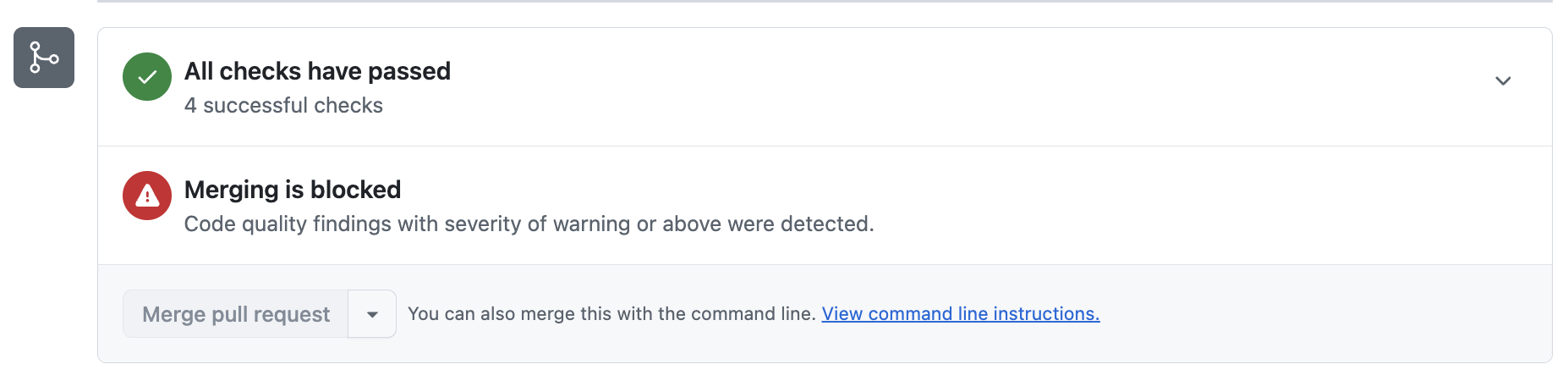
To see whether a gate is in effect, scroll to the Checks section at the bottom of the pull request. If your changes fall below the required threshold, you'll see a merge block banner: "Merging is blocked: Code quality findings were detected."
In our example the gate is set to "Warning and above", so the banner is present: the Error and the Warning are blocking the merge, and the Note is not. That tells you what you have to clear before this pull request can be merged.
If the merge block banner doesn't specify a severity level, you must clear all findings in order to merge your pull request.
For every finding, decide whether it applies to your code and, if it does, how to fix it. That leads you to one of three actions.
| Assessment | Recommended action | Notes |
|---|---|---|
| The finding is legitimate and the suggested fix looks correct | Apply the autofix suggestion | Clicking Commit suggestion doesn't consume AI credits, and autofixes don't require a Copilot license. |
| The finding is real but you want to fix several at once, or the suggested fix needs adapting | Delegate to Copilot—mention @copilot in a comment to hand the work to the cloud agent. Copilot reacts with 👀, starts a new agent session, and pushes the necessary fixes to the pull request's branch |
Requires a Copilot license and consumes AI credits. |
| The finding doesn't apply, for example, it's test code, an intentional pattern, or a false positive | Click Dismiss finding and provide a reason | You'll be able to merge your pull request, but the finding will appear in the repository backlog, and in future pull requests. |
Apply the practice to your own pull request, working in severity order.
In our example:
@copilot, fix all the remaining Note-level findings". We track Copilot's progress in the Agents tab of the repository, and review the commits it pushes to the pull request when they're ready.If you do have blocking findings, once you've fixed or dismissed the relevant findings, return to the Checks section at the bottom of the pull request.
In our example, with the Error and Warning findings resolved, the merge block banner disappears. Your pull request is now clear to merge.
If the banner is still there, it means a finding at or above the blocking severity is still open.
The pull request you just cleared is part of a bigger picture:
The healthiest teams combine all three: deliberate triage and remediation at the pull request stage, periodic backlog work, and enforced thresholds at the merge boundary.
In this tutorial, you've worked through Code Quality comments on a pull request, used severity to prioritize remediation, and resolved each finding intentionally before merging your pull request. By treating each finding, and its autofix, as a small, in-context decision, you prevented code quality debt from reaching your default branch.