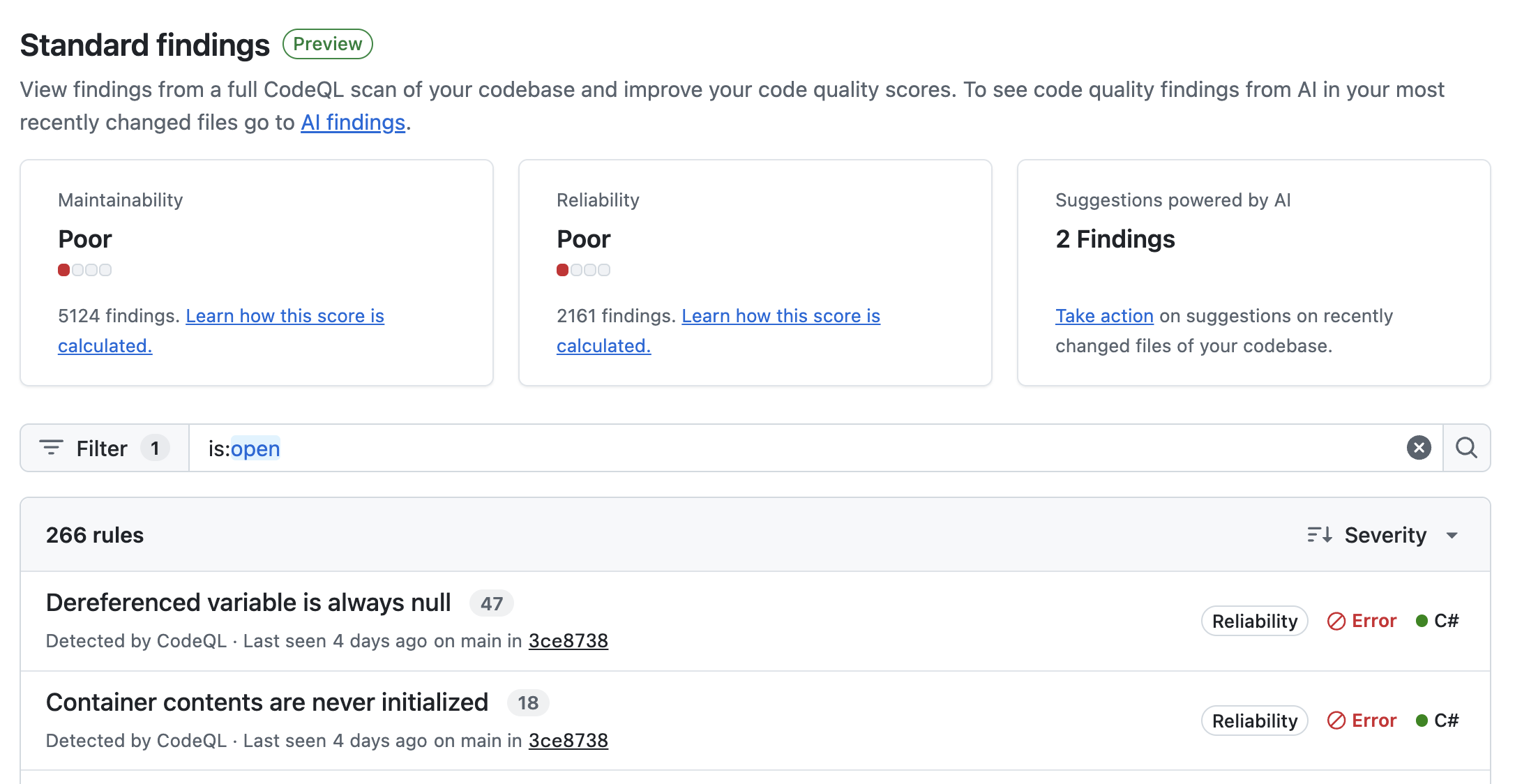
Prioritize and resolve the findings that pose the most risk, raise your repository's code quality score, and prevent new debt from accumulating.
In this tutorial, you'll work through a backlog of Code Quality findings on your default branch, prioritize by risk, resolve the highest-impact findings, and communicate the result to stakeholders. You'll learn:
This is a guided walkthrough, so it favors understanding over speed. For the basic steps of generating an autofix or dismissing a finding, see the companion how-to: Fixing code quality findings in your repository backlog.
Throughout this tutorial, we'll use a running example: a repository whose dashboard currently shows scores of "Reliability: Poor" and "Maintainability: Fair" for code quality.
Here you'll see scores for Reliability and Maintainability.
These scores are calculated from the findings on your default branch:
| Metric | Definition | Example findings |
|---|---|---|
| Reliability | Assess whether the code performs its intended function correctly, predictably, and consistently. Reliable code is free from bugs, handles errors safely, and operates as expected under normal and edge-case conditions. | Issues with performance, concurrency, error handling, correctness |
| Maintainability | Assess how easy it is to understand, modify, and extend the code over time. Maintainable code follows best practices, avoids unnecessary complexity, and is organized for ease of future changes and collaboration. | Unused/dead code, readability, complexity, conflicting naming, poor separation of concerns |
Each score is determined by the highest severity of finding still present for that metric. To raise a score, you have to clear every finding at the current highest severity level.
In our example, Reliability is "Poor" because there are still Error-level findings affecting reliability. Warnings and Notes are worth addressing, but until the Errors are cleared they can't move the score.
In the Standard findings view, findings are grouped by rule. This is useful to understand because a single rule with many findings may reflect one repeated coding habit. Once you understand one occurrence, it may be easier to understand the proposed autofixes for all of them, which makes remediation faster and easier to review in bulk.
In addition, look for rules that would complete a severity tier for one of your scores—if clearing a rule removes the last remaining "Error" affecting Reliability, your score moves up immediately.
In our example, one rule—"Overwritten property"—accounts for 40 of the 128 findings, and all 40 are Error-level. Clearing it would remove every Error-level finding affecting Reliability, which would move our score up to the next bracket.
Once you've picked a rule, decide how to handle each finding:
| Assessment | Recommended action | Notes |
|---|---|---|
| One finding is legitimate. | Click Assign to Copilot. | Copilot opens a pull request containing fixes for the selected findings. Assigning to Copilot consumes AI credits. |
| Multiple findings for the same rule are legitimate. | Select up to 25 findings on a page, then click Assign to Copilot. | Copilot opens a pull request containing fixes for the selected findings. Assigning to Copilot consumes AI credits |
| A finding doesn't apply. For example, it's in legacy code, an intentional pattern, or a false positive. | Click Dismiss. | The finding is considered resolved and removed from the list of open findings. |
In our example, we assign the 40 "Overwritten property" findings to Copilot in batches of up to 25. We review the resulting pull requests and merge them once the CI checks pass.
After you've merged your remediation, return to the "Standard findings" view and capture:
In our example, clearing the "Overwritten property" rule moves Reliability from Poor to Fair—the first score improvement the team can point to.
Every finding you resolved today can reappear tomorrow if new pull requests introduce the same kinds of issue. To stop the backlog regenerating:
In this tutorial, you assessed your repository's quality scores, prioritized backlog work by severity and rule, resolved findings using autofixes, and communicated the outcome as a score movement.